Play-asia Top pre-orders
Showing posts with label e620 pictures testing. Show all posts

Wednesday, 18 January 2012

My new 2.0 speakers

I had been considering to change my 5.1 T6200 speaker system to something more compact as my desk can't really accommodate a 5.1 system. Moreover, T6200 has a fluctuating volume problem from the controller. It has been bothering me for some time. 

As the controller is linked to the subwoofer, I had it changed before when it is under warranty. But the issue came back again after a couple of months, I guess it is a design fault and I gave up on this problem since the warranty is only 1 year.

But It is still usable, you will need to put the controller to max volume, and you adjust the volume by using controls in the OS. But it is troublesome when you are playing games especially you need to switch in between windows.

So I decided to change it to something less complicated but more practical. And I chose a 2.0 to a 2.1 system since I don't have space to put the subwoofer too. Also, I don't need a lot of bass in the music I listened to. Clarity is more important to me.

After looking through recommended brands by forum members which I frequents, it seems AE2, AE5 or M-audio etc and some other brands is strongly recommended due to the quality of sound they produce.

But the price sold locally is pretty steep to me, from almost 300 to 500+ SGD for a 2.0 speakers (out of my budget). They are studio monitor speakers if I am not wrong. So I guess quality is there with this type of pricing.

So in the end, I ended up with Creative T40 Series II as it is within my budget although I am pretty disappointed with the quality and issue with my previous T6200 speaker system. To add on, it seems that one of the flagship model the T3 also suffers from the fluctuating volume issue after a period of usage.

On why I chose T40 Series II, the predecessor T40 has good reviews and the series II offers improvements and new colour scheme (which I kinda like). It is not a new model, it has been around for couple of years and still selling so I guess it is one of the better models.

I had also listen to the speakers at its local store, it sounds pretty good to me compared to T6200 although I am not a audiophile. The driver and tweeter materials used seems to be better than a typical multimedia speakers.

Also, you can adjust the bass and treble via the knobs available. As for the pricing, it is on a in house promotion on a local Creative store. It cost 159 SGD compared to 169 SGD or more selling at other places. Highest price I saw was the MSRP price of 199 SGD.I would say 159 SGD is more reasonable pricing.

Below are the pics:

 Nice box

 Protection

 Whole package 1

 Whole package 2

 Speaker filter

MTM design

Mini review: Tested with my onboard audio with the speakers, it sounds pretty good and better than my previous T6200 in terms of clarity in music. The bass is pretty strong in the default position, I had to adjust it down so that the music feels more natural to my ears (I am not a basshead). I guess Creative products emphasis on the bass.

The difference is not huge with or without the speaker filters. But if you are looking for strong bass, you are better off with a 2.1 system.  As you may noticed, most of the connection is gold plated for better connectivity.

The bass produced is fine with me and these speakers can get pretty loud too. I might get a soundcard in future to improve the my audio source quality. On the downside, my current speakers may not be able bring out the full potential of the future sound card.

In my opinion, onboard sound has improved quite a lot these years but having a discrete soundcard will still make a difference to me. But in the end, everyone listening standards is different. What sounds "fine" to me might sound crap to other people.

So it is the best if you listened to the speakers yourself to judge. The only thing I hope is that it will not have the volume issue after a certain period of time. Otherwise it is off to hunt another speaker system mission again :).

Saturday, 17 December 2011

Palit Geforce 560 Ti Twin Light Turbo 1GB Limited edition

Got my new graphics card finally, it is Palit Geforce 560Ti from Palit. It is a limited edition. Therefore, it is on limited output from the factory. And it is slightly over-clocked by the factory too. However, you can overclock it further by yourself as GTX560Ti to harness its power even more. MSI afterburner is a good software to use, easy and intuitive! 

Anyway, I was deciding between Radeon 6950 and Geforce 560Ti. Although 6950 is faster by default, a overclock 560Ti is able to match the speed of a stock 6950 although the end result is that 6950 is still the champion in this range.

Another reason is the card length of 560Ti, it reference length is 9 inches I think. Radeon 6950 seems to longer with 10.6 inches. With all the manufacturer out there, it seems that Palit makes the shortest card compared to the reference model.

It is a few cm shorter than reference and it suits my Silverstone SG-02F case, the downside I guess will be the 2 years local warranty that is given by the distributor as certain brands gives 3 years warranty. It is really a nice but powerful little card. Below is the unboxing video and some pictures of it.

My unboxing video

 Nice box

 Contents

 Nice design

 4 heatpipes

Short card length

A little mini review:

The light is lit up with a red glow from the two fans, it is nice in a way. However, it will be even better if it comes with a 2 GB version or have some heatsinks on those VRM chips.

On a side note, I got a extra 8GB of G-skill value rams again with this purchase since it the price is still economical. Now end up with a total 16GB of RAM on all 4 slots although my system will not be able to fully utilised it lol. It is there for the "fill up every RAM slots" mentality. Never know when you need the extra memory lol.

Thursday, 1 December 2011

HTPC build 2011 part 3/3

Finally, for the motherboard and RAMs. As I don't OC the CPU or anything, it will be better to use H67 chipset compared to Z68 or P67. Also, I was also particular about the board layout, design etc. Having heatsinks on the VRM is a must for me since I feel it will prolong the life of it. Also, I will not be using a K series CPU since I don't overclock, a i5 2400 should suffice for me for my budget.

After all the researching on the different MB brands, I narrowed down to ECS (H67H2-M) or ASUS (P8H67-M EVO). Comparing both of them, they both look good with their individual colour themes and their VRM heatsinks.

ECS is lower cost and short of internal 1394 header and crossfire but ASUS has almost everything on the the board from 1394 (obsolete soon I feel) to crossfire. It even has a 2-port USB and eSATA module compared to ECS only has eSATA module. Of course, the price difference is there.

I wanted the ECS due to cost but the shop (lowest priced among all the shops) that I went to is out of stock for ECS. After some consideration, I decided to get the Asus board instead. And I am pretty happy with it.

Below is my unboxing video:


P8H67-M EVO unboxing

The pictures:

 Contents

 View 1

 View 2

 View 3

View 4

Lastly for the RAMs, as I don't overclock and with H67 chipset, I am limited to 1066 or 1333 rams. It is either Kingston or G-skill value rams for me. I choose the G-skill as it cost lower than Kingston and I shouldn't see any real world difference in them.

The PCB is black compared to Green for Kingston. I bought 2 sticks of 4GB each and it adds up to 8GB. It should be more than enough for Windows 7.

The picture:

G-skill value rams

For my future upgrades, I will be getting a Graphics card, maybe some fans and maybe even more RAMs if the price is good. It is a pity that my old fans can't be used due to size. Will do a post once I bought the stuffs.

Pictures of my HTPC build:

 My HTPC

 i5 2400

 Contents of i5 2400

 nice copper base

 low height

 Comparison with kozuti

 Mount nicely

 Clear VRM heatsinks

 Fans transfer

Assembling

 Close up

Completed

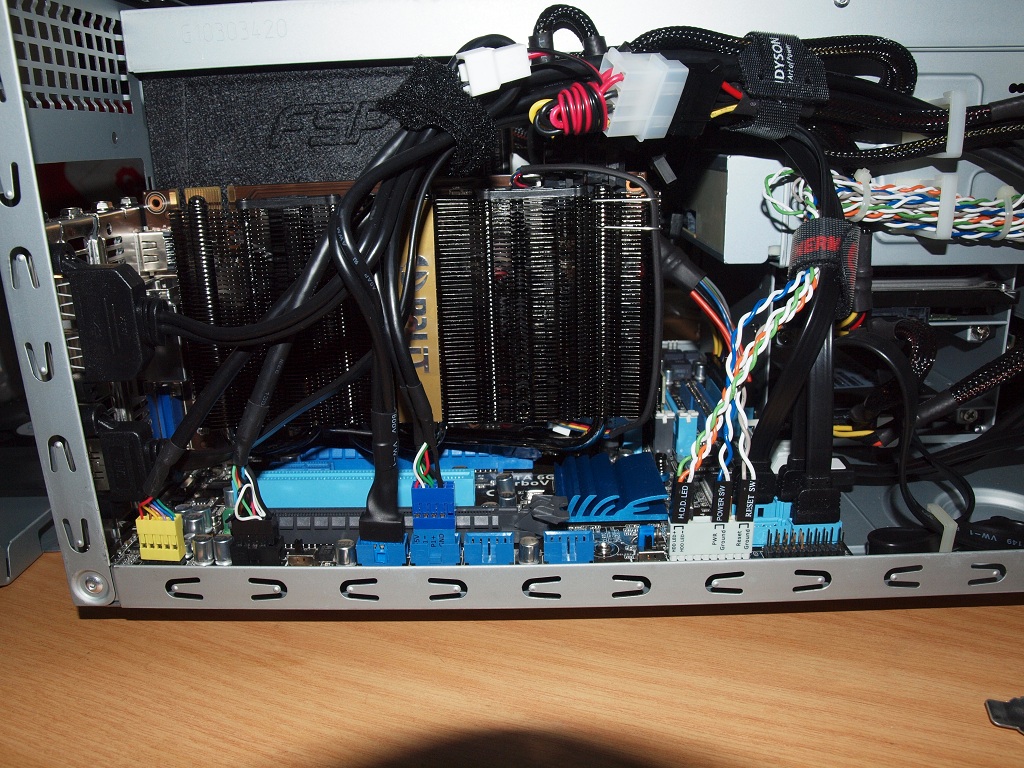
As you can see, the cable management is pretty messy. If you wish to have a neater management, I guess a modular PSU will be more useful but the length of the PSU will be slightly longer.

Wednesday, 16 November 2011

HTPC build 2011 part 2/3

Next up, I am going to choose the storage device and PSU. All the while, I had been using HDD although SSD has been available for couple of years now. However, due to the steep price when it was first released.

I wouldn't think of buying it until recently where the price dropped to a reasonable level I guess. If you buy it online, it seems to be cheaper than buying locally but the warranty will be an issue since it needs to be send back in an event of RMA. Therefore, I rather pay a bit more for the local warranty to save the hassle.

As for the advantage and disadvantages, there is plenty of websites explaining the differences between SSD and HDD. One of the major advantages is the access speed and therefore, I decided to buy one as a boot drive since it is said to be much much faster compared to HDD.

I choose Crucial M4 64GB after reading the reviews and it is manufactured locally (they have a production plant here), it may not be the fastest SSD but it is pretty stable according to reviews. Moreover, it is a SATA3 interface and seems to be the least costly compared to other brands.   

My unboxing video below:

Crucial M4 64GB SATA3 SSD unboxing

The picture:

The package

Well, I do feel Crucial is a bit stingy in way that not even the the mounting screws is provided. Only the manual is given and nothing else. It will be good to have a couple of screws or maybe a 3.5" to 2.5" bay converter since it is much more expensive compared to HDD. At least it will let the user have a "feel good" factor. 

For the PSU, FSP Aurum 500W Gold seems to be a good choice. It is shorter by 2cm compared to its modular counterpart and other PSU. Moreover, it has a Gold efficiency rating and so in the long run, it should save some electricity bills.

My unboxing video:


The picture:

The package

Wednesday, 9 November 2011

HTPC build 2011 part 1/3

The day came earlier than expected to upgrade my PC. As mentioned before, I am going for a smaller PC rather than ATX form factor. So I decided on mATX rather than mini ITX as mATX still have some expansion slots if I need it but not as much slot as ATX board.

For the case, I had been researching online for different type of mATX available locally. As most of the case seems to be those typical tower type mATX casing, which is the ones I want to avoid. And also I prefer the board to be sitting down rather than mounted sideways. So there isn't a lot of choice available for SFF case. And Silverstone seems to fit the bill as it is available locally.

The link for the case:  Silverstone SG-02F
 
As you all may already know, Silverstone makes interesting and unique cases. This particular shoebox type case caught my eye which is the SG-02F, they are in the SFF(small form factor) category. Small but has almost everything.  It is only half the height of my current NXZT alpha gaming case and it is shorter in length too but slightly wider.

Do take note it is not a new model, it is couple of years old so no USB 3.0 front port for it. It has a full aluminium version and a steel version, the steel version is the one I am looking for since it cost lower but has the same design other than lesser front USB 2.0 ports.

Also the cable management might be a issue too since the room is really limited. But I guess there has to be some sacrifices made somewhere for its small form. It cost around 92-95 SGD for the steel version and the aluminium type cost around 155 SGD locally.

My unboxing video:

Silverstone SG-02F

The pictures:

 Pic 1

 Pic 2

 Pic 3

 Pic 4

 Pic 5

 Pic 6

 Pic 7

 Pic 8

Pic 9

Also, if you wish to use the crossflow fan, you need the default heatsink or some other brands low profile CPU cooler like Scythe Kozuti. Otherwise, you will not be able to mount it.

Wednesday, 21 September 2011

Comex show 2011 purchases Part 2/2

As mentioned in one of my earlier post, I had a extra SIM card for the mobile broadband when I renew my Singtel home broadband contract. But I didn't opt for a Singtel HSDPA USB key since there will be extra charges and the design isn't very appealing.

It has been a while that the SIM card is gathering dust. So I decided to get a Prolink HSDPA USB adapter (PHS101) to use the SIM card, since the price is pretty reasonable and the design is pretty neat. It cost 69 SGD. Also, it has a extra microSD slot for your microSD memory card.

 Nice box

 In the box

Casing off

Wednesday, 14 September 2011

Comex show 2011 purchases Part 1/2

It has been some time since I am considering to upgrade my monitor to a full HD monitor (1920x1080). Also, I had read up on panel type that is used on LCD screen. Basically, it is TN and IPS panel. TN is more mainstream while IPS is used more for photography works.

There is some difference in the colour but I am not a expert on this. It can be read up on the web between the advantages and disadvantages. Since my old Samsung monitor is a TN panel (about 3-4 years ago), I decided it is time to get a better monitor and a different panel. So a IPS panel for me this time and also FULL HD!! More details and richer colour perhaps!! By the way, the screen is matt which is the one I prefer over glossy type.  

Seems reasonable enough for me with a monitor + freebies. Actually the freebies doesn't interest me since it is nothing special. The choices available are a LG mobile phone or Capsule speakers or a bluetooth. HDMI cable will be included for whichever gifts you choose, but you can opt for without freebies and the monitor will cost 30 bucks less (278-30=248 SGD).

However, there is another special gift that is not on the brochure, you can opt for a Canon Pixma printer which I feel is more worthwhile compared to 30 bucks discount or the original free gifts. So here is the monitor plus the printer.

 Whole package

 Monitor contents

Another view

Mini review: The colour reproduction seems to be overall much richer compared to TN panel.

Wednesday, 17 August 2011

Andyson F600M PSU

One fine day, when I switched on my PC. A loud "pop" sound is heard and I smell something is burned. And it is coming from the PSU, a enermax PSU to be precise. It had served me for almost 3 years but if I didn't remember wrongly, the warranty is 5 years. And my DVD writer has problem too recently. So 2 parts of my PC is not working.

So I am pondering whether I should RMA it or get a cheaper PSU which is faster. But I am not sure if the PSU has affected the rest of my rig. And whether it is worthwhile to upgrade my PC now. Less than 30 bucks for DVD writer vs 1k~1.2k SGD for a new rig.

Finally, my decision is to check with the distributor if my PSU is still in warranty. The answer is yes since I had only used the PSU for close to 3 years and the warranty for Enermax is 5 years! However, they do not have this model for 1-1 exchange anymore and had to be send to the manufacturer for repair which I think will take a long time.

So I suggested swapping with a different brand of equivalent value PSU, and they recommend Andyson F600M which I don't mind since it is a modular type PSU (compared to my non-modular PSU) and the wattage is slightly less (previous Enermax is 625w). Good service from them, since my previous PSU left 2 years warranty and it was bring over to my new PSU. They also throw in a extra 1 year warranty for this new PSU which makes it 3 years that is equivalent to a new set warranty.  

In conclusion, I swap my PSU for a different brand and bought a new DVD writer to replace my faulty one. But I choose a LG DVD writer this time since my previous Sony model didn't last long. So, although my rig is still usable, but I am still tempted to get a new rig to keep up with the technology every couple of years. Will see how it goes.

Below are the pics:

 PSU and DVD writer

 PSU

 DVD writer

 PSU package

 Specs

DVD package